
 Ban biên tập Backcom VN
21 phút đọc
Ban biên tập Backcom VN
21 phút đọc

Nội dung bài viết8
Chọn MT4 hay MT5 thường trở thành vấn đề khi bạn không đăng nhập được tài khoản, không chạy được EA quen thuộc hoặc cần tính năng mà nền tảng đang dùng thiếu. Hai nền tảng cùng nhà phát triển, nhưng khác nhau về công cụ, cách quản lý vị thế và khả năng kiểm thử. Lựa chọn phù hợp phụ thuộc vào sản phẩm bạn giao dịch, công cụ bên ngoài và cấu hình máy.
Cập nhật lần cuối: 03/10/2026.
Khác biệt cốt lõi giữa MT4 và MT5
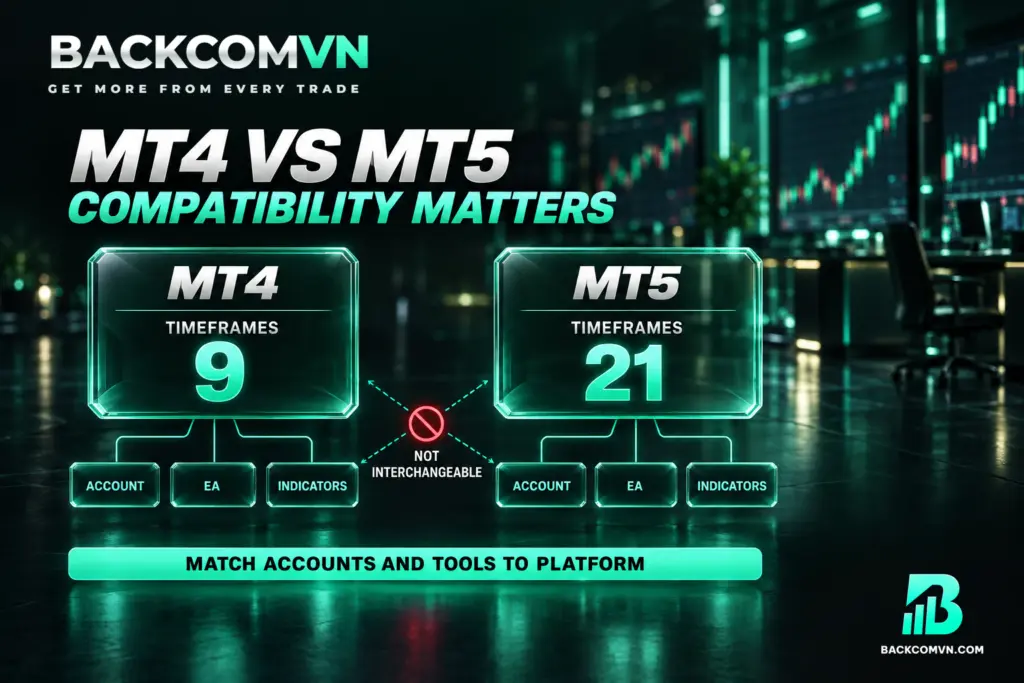
MT5 không phải bản nâng cấp của MT4 mà là nền tảng khác, được viết lại từ đầu. Vì vậy, chuyển từ MT4 sang MT5 không đơn thuần là cài phiên bản mới rồi tiếp tục dùng toàn bộ tài khoản và công cụ cũ. Bản mô tả chính thức của hai nền tảng nằm ở trang giới thiệu nền tảng MT4 và phần bắt đầu sử dụng của tài liệu MT5.
Hệ quả quan trọng nhất là EA và chỉ báo viết cho MT4 không chạy được trên MT5, và ngược lại. Nếu công việc giao dịch phụ thuộc vào một công cụ cụ thể, cần kiểm tra công cụ đó có phiên bản dành cho nền tảng định chọn hay chưa.
Tương tự, tài khoản MT4 không đăng nhập MT5 được và ngược lại. Khi gặp lỗi đăng nhập, hãy đối chiếu nền tảng của tài khoản với ứng dụng đang mở trước khi cho rằng mật khẩu sai. Bảng dưới đây tóm tắt các khác biệt phục vụ việc lựa chọn.
| Tiêu chí | MT4 | MT5 |
|---|---|---|
| Khung thời gian | 9 khung | 21 khung |
| EA và chỉ báo | Dùng phiên bản viết cho MT4 | Dùng phiên bản viết cho MT5 |
| Lệnh chờ | Ít loại hơn MT5 | Nhiều loại hơn, gồm stop limit |
| Kiểm thử chiến lược | Không có lợi thế kiểm thử đa luồng và đa sản phẩm như MT5 | Đa luồng, đa sản phẩm, cho phép kiểm thử danh mục |
| Quản lý vị thế | Hedging mặc định | Hedging hoặc netting, theo cấu hình sàn |
| Tài nguyên máy | Nhẹ hơn, phù hợp máy cấu hình thấp | Cần cân nhắc theo cấu hình và số công cụ chạy |
| Tình trạng phát triển | Chỉ còn nhận sửa lỗi | Tiếp tục được phát triển |
MT5 có gì hơn, MT4 còn giá trị ở đâu?
MT5 mở rộng công cụ phân tích và kiểm thử
MT5 có 21 khung thời gian, so với 9 khung của MT4. Sự khác biệt này hữu ích khi phương pháp phân tích cần quan sát nhiều khoảng thời gian. Tuy nhiên, nếu bạn chỉ sử dụng các khung đã có trên MT4, số khung bổ sung chưa phải lý do quyết định.
MT5 cũng có nhiều loại lệnh chờ hơn, gồm lệnh stop limit, và Lịch kinh tế tích hợp sẵn. Giá trị thực tế nằm ở việc các tính năng đó có phục vụ quy trình giao dịch của bạn hay không, thay vì chỉ so sánh số lượng tính năng.
Với người dùng chiến lược tự động, Kiểm thử chiến lược trên MT5 hỗ trợ đa luồng và đa sản phẩm, nhanh hơn đáng kể và cho phép kiểm thử danh mục. Đây là điểm đáng cân nhắc khi cần đánh giá chiến lược trên nhiều sản phẩm. Kết quả kiểm thử vẫn không phải cam kết về kết quả giao dịch thực tế.
MT5 hỗ trợ chứng khoán và hợp đồng tương lai, đồng thời có dữ liệu độ sâu thị trường ở nơi sàn cung cấp. Cần phân biệt khả năng của nền tảng với danh mục thực tế của sàn: nền tảng hỗ trợ không có nghĩa mọi tài khoản đều được truy cập các sản phẩm và dữ liệu đó.
MT4 vẫn phù hợp với công cụ và hạ tầng sẵn có
MT4 có kho EA và chỉ báo khổng lồ tích lũy hơn mười năm. Nếu công cụ cần thiết chỉ có bản MT4, tính tương thích có thể quyết định lựa chọn. Chuyển nền tảng trước khi có bản thay thế phù hợp sẽ làm gián đoạn quy trình đang sử dụng.
MT4 nhẹ hơn, chạy tốt trên máy cấu hình thấp và VPS rẻ. Lợi thế này đáng chú ý khi chạy nhiều tài khoản. Dù vậy, nên thử với đúng số tài khoản, biểu đồ và công cụ dự kiến sử dụng để đánh giá khả năng đáp ứng của máy.
Về phát triển, MT5 vẫn được phát triển tiếp, còn MT4 chỉ nhận sửa lỗi. MT4 chưa biến mất và vẫn có lý do sử dụng, nhưng người bắt đầu mới nên cân nhắc hướng phát triển này khi chưa bị ràng buộc bởi công cụ cũ.
Netting và hedging ảnh hưởng cách quản lý lệnh
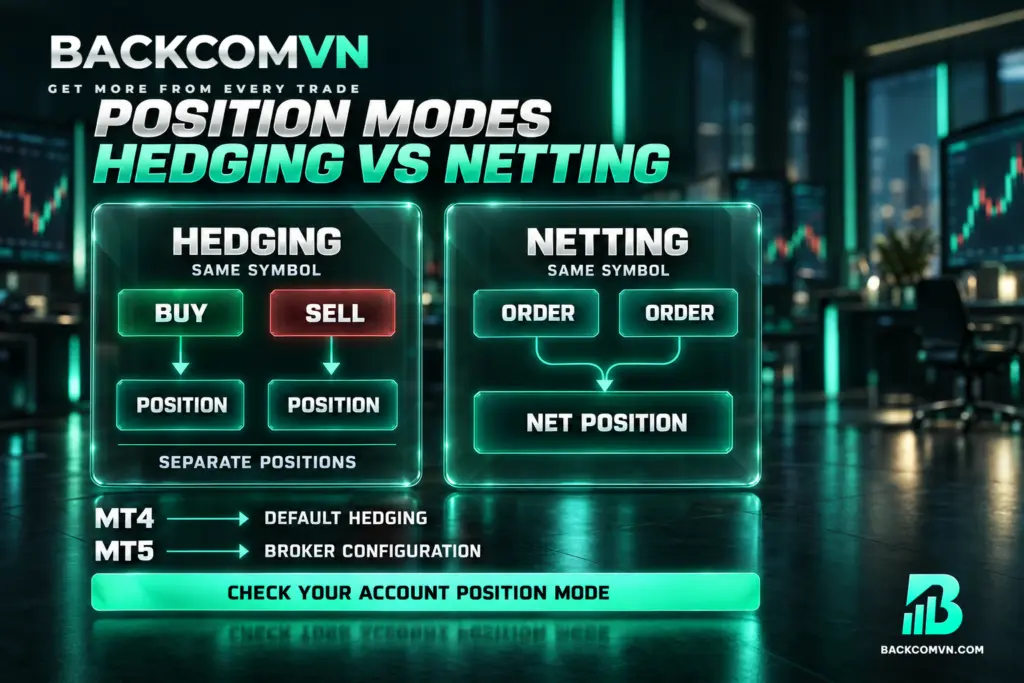
MT4 có cơ chế hedging mặc định, cho phép giữ đồng thời lệnh mua và bán trên cùng sản phẩm. MT5 hỗ trợ cả hedging lẫn netting, nhưng cấu hình do sàn quyết định. Đây là khác biệt cần kiểm tra trước khi mở tài khoản. Cách MetaTrader xử lý lệnh và vị thế được mô tả trong phần khái niệm giao dịch trong tài liệu MT5.
- Hedging: mỗi lệnh là một vị thế riêng, giống cách quản lý trên MT4.
- Netting: mọi lệnh trên cùng sản phẩm được gộp thành một vị thế duy nhất.
Giả sử chiến lược yêu cầu giữ riêng từng vị thế trên cùng cặp tiền để quản lý theo từng lần vào lệnh. Khi dùng tài khoản netting, việc gộp vị thế làm thay đổi cách thực hiện yêu cầu đó. Sự khác biệt nằm ở cơ chế tài khoản, không chỉ ở giao diện phần mềm.
Nếu chiến lược hoặc EA dựa trên nhiều lệnh riêng lẻ, hãy xác nhận sàn cấp chế độ nào trước khi mở. Không nên suy ra rằng mọi tài khoản MT5 đều hoạt động giống MT4 chỉ vì MT5 có hỗ trợ hedging. Việc giữ đồng thời vị thế mua và bán cũng không loại bỏ rủi ro giao dịch.
Nên chọn MT4 hay MT5 theo nhu cầu?
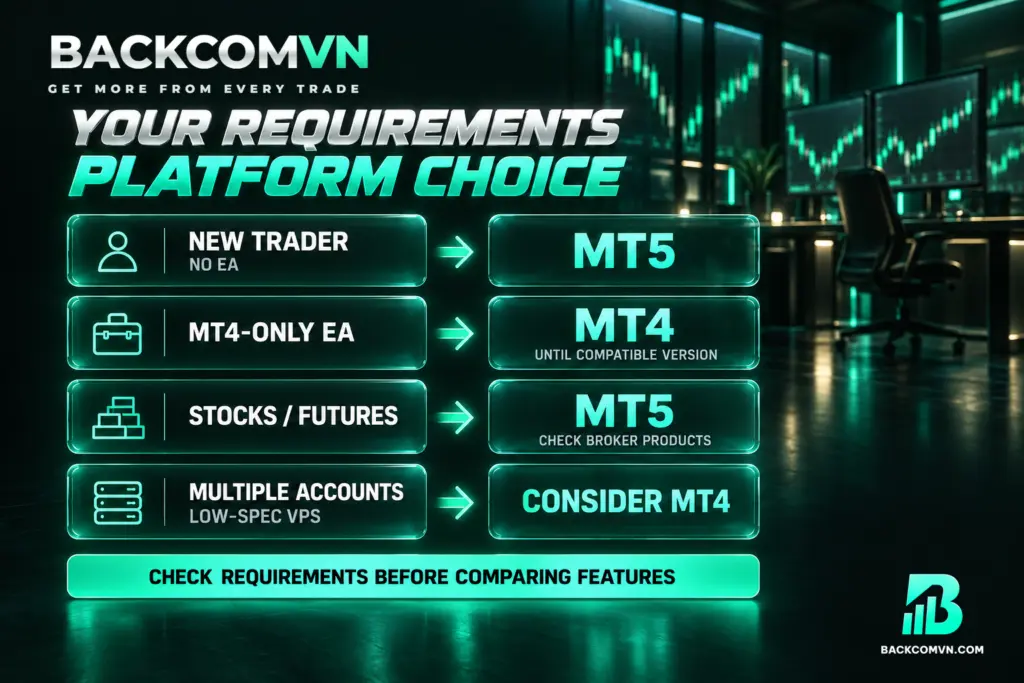
Cách lựa chọn thực tế là xác định điều kiện bắt buộc trước, rồi mới so sánh tính năng bổ sung. Một nền tảng có nhiều chức năng hơn vẫn có thể không phù hợp nếu thiếu phiên bản EA bạn cần hoặc không đáp ứng cách quản lý vị thế của chiến lược. Ngoài hai nền tảng này còn một lựa chọn thứ ba — xem cTrader khác MT4/MT5 ở những điểm nào.
- Người mới, không dùng EA: ưu tiên MT5. Khi chưa phụ thuộc công cụ MT4, hướng phát triển tiếp của MT5 là lý do hợp lý để bắt đầu.
- Đang phụ thuộc EA chỉ có bản MT4: tiếp tục dùng MT4 cho tới khi có bản chuyển đổi phù hợp.
- Giao dịch cả cổ phiếu hoặc hợp đồng tương lai: chọn MT5, đồng thời xác nhận sàn có cung cấp sản phẩm cần giao dịch.
- Chạy nhiều tài khoản trên VPS cấu hình thấp: MT4 đáng cân nhắc vì nhẹ hơn.
Trước khi chuyển nền tảng, nên lập danh sách EA, chỉ báo và yêu cầu quản lý lệnh đang sử dụng. Đối chiếu từng mục với nền tảng mới giúp nhận ra phần nào có thể tiếp tục dùng, phần nào cần phiên bản khác và phần nào phải kiểm tra lại.
Nếu đã có bản chuyển đổi của EA, không nên mặc định mọi hành vi đều giống bản cũ. Cần kiểm thử cách đặt lệnh và quản lý vị thế trong cấu hình dự kiến sử dụng. Tương thích về nền tảng là điều kiện cần để vận hành, chưa đủ để kết luận chiến lược phù hợp.
Kiểm tra ký hiệu sản phẩm và chi phí trước khi chuyển
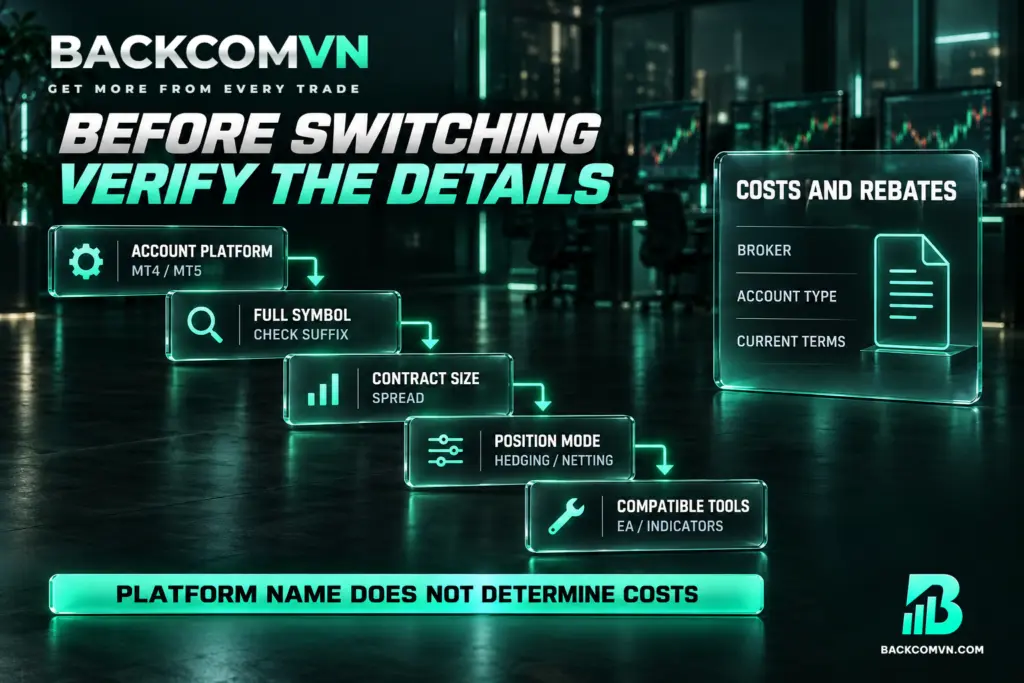
Trên cả MT4 và MT5, cùng một cặp tiền có thể xuất hiện với nhiều đuôi khác nhau tùy loại tài khoản. Vì vậy, nhận ra tên cặp tiền chưa đủ để kết luận rằng điều kiện giao dịch giống nhau. Cần đối chiếu đúng ký hiệu sẽ dùng trên tài khoản đích. Thông số từng sản phẩm — spread, cỡ hợp đồng, mức swap theo ngày — nằm ở cửa sổ Specification, theo tài liệu Market Watch của MetaQuotes.
Trước khi chuyển chiến lược, hãy kiểm tra kích thước hợp đồng và spread của ký hiệu đó, vì chúng có thể khác nhau. Nếu chỉ sao chép thiết lập cũ mà bỏ qua thông số sản phẩm, bạn có thể áp dụng chiến lược trên những điều kiện khác với điều kiện đã kiểm thử.
- Xác nhận tài khoản thuộc MT4 hay MT5 và đăng nhập bằng đúng nền tảng.
- Đọc đầy đủ ký hiệu sản phẩm, gồm cả phần đuôi theo loại tài khoản.
- Đối chiếu kích thước hợp đồng và spread của đúng ký hiệu dự kiến giao dịch.
- Kiểm tra chế độ hedging hoặc netting nếu dùng MT5.
- Xác nhận EA và chỉ báo có phiên bản tương thích trước khi vận hành.
Với người quan tâm hoàn phí giao dịch, lựa chọn MT4 hay MT5 cũng cần tách khỏi việc xác minh điều kiện hoàn phí. Không thể suy ra mức hoàn phí, spread hay chi phí tổng thể chỉ từ tên nền tảng. Hãy đối chiếu điều kiện áp dụng cho đúng sàn và loại tài khoản.
Điều kiện và mức phí do sàn công bố có thể thay đổi bất kỳ lúc nào. Các thông tin đã kiểm tra trước đây cần được đối chiếu lại khi chuyển tài khoản hoặc nền tảng. Khoản hoàn phí cũng không nên được xem là căn cứ để tăng khối lượng giao dịch.
Chuyển nền tảng: những thứ không mang theo được
Quyết định dùng nền tảng nào thường được bàn ở mức tính năng, nhưng chi phí thật của việc chuyển lại nằm ở những thứ nhỏ, tích luỹ qua thời gian và không đi cùng bạn sang chỗ mới. Biết trước danh sách đó giúp bạn chọn đúng thời điểm chuyển, và chuyển một lần cho xong thay vì nửa chừng quay lại.
Thứ không mang theo được rõ nhất là lịch sử giao dịch. Mỗi tài khoản có lịch sử riêng trên hệ thống của sàn; mở tài khoản trên nền tảng khác nghĩa là bắt đầu một lịch sử mới, và không có cách nhập dữ liệu cũ vào. Nếu bạn đang dùng lịch sử để tính các chỉ số về cách giao dịch của mình, hãy xuất toàn bộ ra tệp trước khi chuyển, và lưu cùng chỗ với nhật ký — sau này muốn so giai đoạn trước và sau thì vẫn còn dữ liệu để so.
Thứ hai là toàn bộ phần thiết lập bạn đã dựng dần: mẫu biểu đồ với bộ chỉ báo và màu sắc quen mắt, danh sách theo dõi, các cảnh báo giá đang chờ, và những công cụ bổ trợ bạn đã cài. Phần này phải làm lại từ đầu, và phần dễ quên nhất là các cảnh báo giá — chúng nằm im nên không ai nhớ, tới khi một mức giá quan trọng bị bỏ lỡ mới nhận ra. Trước khi chuyển, chụp lại danh sách cảnh báo đang có và danh sách mã trong watchlist.
Thứ ba, và là thứ gây lỗi âm thầm nhất: nhật ký của bạn gắn với ký hiệu sản phẩm cũ. Cùng một sản phẩm có thể mang ký hiệu khác ở nơi mới, kèm đuôi khác, và đôi khi quy cách hợp đồng cũng khác. Những con số bạn đã rút ra — khoảng dừng thường dùng, khối lượng quen thuộc, mức spread bạn coi là bình thường — đều gắn với ký hiệu cũ và không chuyển thẳng sang được. Phải đọc lại đặc tả hợp đồng của từng mã ở nơi mới rồi mới áp lại các con số ấy.
Gộp lại thành một danh sách việc cần làm trước khi chuyển: xuất lịch sử giao dịch ra tệp; chụp danh sách cảnh báo và watchlist; ghi lại thiết lập biểu đồ đang dùng; đọc đặc tả hợp đồng của các mã chính ở nơi mới và đối chiếu với con số cũ. Năm việc này mất một buổi, nhưng chúng là phần khác biệt giữa một lần chuyển gọn và vài tuần lệch lạc sau đó. Cách đọc ký hiệu và phần đuôi sản phẩm nằm ở bài ký hiệu cặp tiền đọc thế nào.
Câu hỏi thường gặp
Người mới không dùng EA nên chọn nền tảng nào?
MT5 là lựa chọn ưu tiên vì tiếp tục được phát triển và có nhiều công cụ hơn. Khi chưa phụ thuộc EA hoặc chỉ báo riêng của MT4, người mới không có ràng buộc tương thích cần giữ lại. Vẫn cần kiểm tra sản phẩm và cấu hình tài khoản do sàn cung cấp.
Tài khoản MT4 có dùng để đăng nhập MT5 được không?
Không. Tài khoản MT4 không đăng nhập được MT5 và ngược lại. Nếu đăng nhập thất bại, hãy kiểm tra tài khoản được mở cho nền tảng nào trước. Cài thêm MT5 không tự chuyển tài khoản MT4 hiện có thành tài khoản sử dụng được trên MT5.
Có thể chuyển nguyên EA từ MT4 sang MT5 không?
EA viết cho MT4 không chạy trực tiếp trên MT5. Bạn cần phiên bản dành cho MT5 hoặc bản chuyển đổi. Nếu EA thiết yếu chỉ có bản MT4, tiếp tục dùng MT4 là lựa chọn phù hợp cho tới khi có bản thay thế đã được kiểm tra.
MT5 có giữ đồng thời lệnh mua và bán như MT4 không?
Có khi tài khoản dùng chế độ hedging. Nếu sàn cấp tài khoản netting, các lệnh trên cùng sản phẩm được gộp thành một vị thế. Vì vậy, cần hỏi rõ chế độ tài khoản trước khi mở nếu phương pháp của bạn yêu cầu quản lý các vị thế riêng biệt.
Dùng MT5 có đồng nghĩa với chi phí thấp hơn MT4 không?
Không thể kết luận từ tên nền tảng. Cần kiểm tra loại tài khoản, ký hiệu sản phẩm và điều kiện phí sàn công bố. Khi so sánh hoàn phí, cũng cần đối chiếu điều kiện áp dụng thực tế; các tính năng phân tích của MT5 không tự xác định chi phí giao dịch.
Kết luận
MT5 phù hợp để bắt đầu khi không có ràng buộc về công cụ, đặc biệt nếu cần kiểm thử danh mục hoặc giao dịch thêm chứng khoán và hợp đồng tương lai. MT4 vẫn có giá trị với người phụ thuộc EA riêng và người vận hành nhiều tài khoản trên hạ tầng cấu hình thấp.
Trước khi chọn hoặc chuyển nền tảng, hãy xác minh khả năng tương thích, cơ chế quản lý vị thế và thông số của đúng sản phẩm. Với chi phí và hoàn phí, căn cứ cần dùng là điều kiện tài khoản do sàn công bố. Lựa chọn nền tảng giúp tổ chức việc giao dịch, không thay thế việc kiểm soát rủi ro.
Nội dung trên mang tính thông tin, không phải lời khuyên đầu tư và không phải cam kết lợi nhuận. Giao dịch forex và CFD có đòn bẩy tiềm ẩn rủi ro cao và có thể dẫn tới mất toàn bộ vốn. Số liệu và điều kiện của từng sàn thay đổi theo thời điểm — hãy đối chiếu với trang sàn tương ứng trước khi quyết định.
Ban biên tập Backcom VN
Ban biên tập Backcom VN theo dõi chi phí giao dịch Forex cho trader Việt: biểu phí, mức hoàn phí và giấy phép của tám sàn, cùng các số liệu thị trường ảnh hưởng tới chi phí mỗi lệnh. Mọi con số trong bài đều dẫn nguồn công khai kèm ngày truy cập để bạn tự kiểm chứng.
Bài viết liên quan

Giờ máy chủ MT4/MT5 lệch giờ Việt Nam bao nhiêu?
Nến ngày trên biểu đồ đóng theo giờ máy chủ của sàn, thường GMT+2 hoặc GMT+3 — chậm hơn giờ…

VPS cho giao dịch: khi nào thật sự cần
Stop loss và take profit nằm trên máy chủ của sàn và vẫn hoạt động khi bạn tắt máy —…

cTrader là gì và khác MT4/MT5 ở những điểm nào
Trong tám sàn Backcom VN theo dõi, chỉ IC Markets có cTrader. Bảy sàn còn lại dừng ở MT4 và…

Hướng dẫn đăng nhập HFM vào MT4/MT5 chi tiết cho người mới
HFM có nhiều nền tảng hơn phần lớn sàn cùng nhóm — MT4, MT5, HFM WebTrader và HFM App —…

MACD là gì và dùng trong trường hợp nào
Histogram cho tín hiệu sớm nhất, cắt đường 0 đáng tin hơn giao cắt hai đường. Và vì sao chồng…

Tính khối lượng giao dịch theo mức rủi ro
Rủi ro quyết định khối lượng, không phải ngược lại. Cùng mức rủi ro 50 USD cho ra 0,2 lot…