
 The Backcom VN editorial team
20 min read
The Backcom VN editorial team
20 min read

In this article7
Understanding how to set up a trading rebate starts with three practical checks: registering with the correct referral code, completing verification and confirming where payments are credited. Across the eight brokers on Backcom VN, the main steps are similar, but arrangements for existing accounts and payment destinations differ. This guide follows the order in which you need to act and explains what to check before trading through a forex rebate account.
Last updated: 09/10/2026.
How to set up a trading rebate in three steps
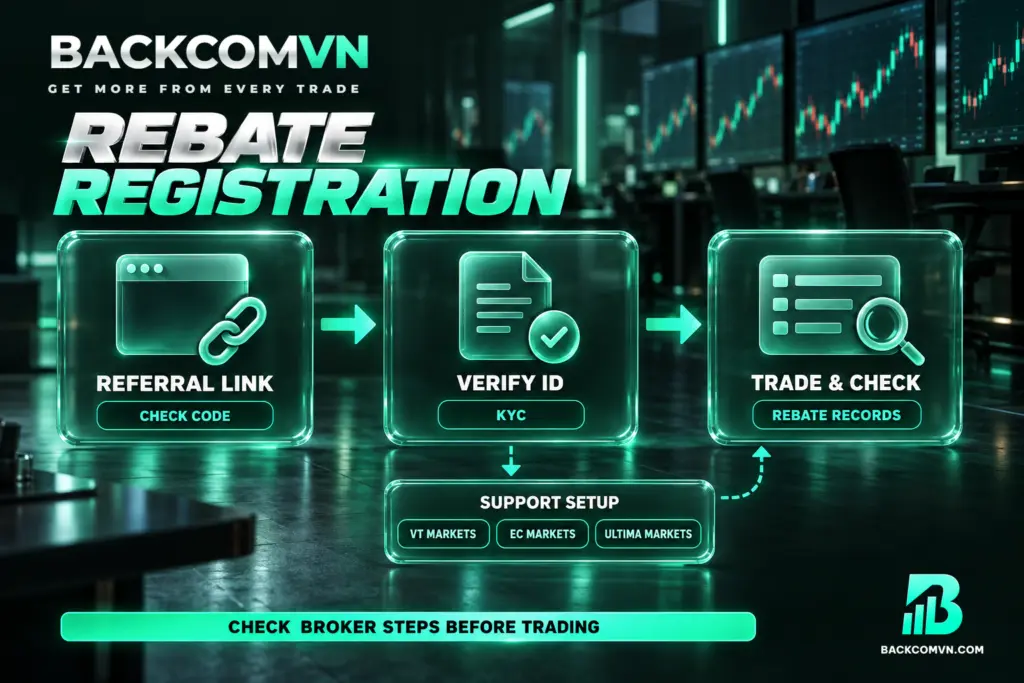
Step 1: Open an account using the correct referral link or code
Choose a broker, follow its Backcom VN referral link and register a new account. Where a rebate referral code is available, prioritise entering it and check it before completing registration. If registering in a browser, open an incognito window from the outset to reduce the risk of losing the referral attribution during the process.
For Vantage, HFM, EC Markets and Ultima Markets, choose the appropriate link because the available options have different spreads. Vantage, EC Markets and Ultima Markets specifically note that the markup associated with a link cannot be changed after the account has been opened. Compare these options and settle on the link before starting registration.
There is no single account-opening timeframe that applies across all eight brokers. If you already have an account, read the existing-account section below before opening another one or submitting a request to change your introducing broker, commonly called an IB.
Step 2: Complete account verification with the broker
Complete the broker’s know-your-customer verification, or KYC, using one of three identification documents: a citizen identity card, driving licence or passport. Accounts opened under Backcom are attributed automatically, so the general process requires no additional linking action. However, account attribution and rebate payment setup are separate checks when the broker’s instructions include an additional support step.
No common KYC approval timeframe is specified for the eight brokers. Monitor your verification status directly with your broker. A daily rebate payment cycle does not mean identity checks will be completed within the same period, and should not be used to estimate when verification will finish.
Step 3: Trade and check your rebate payments
Once registration and verification are complete, deposit funds and trade as usual. VT Markets includes an additional instruction to contact the Backcom VN support team to set up automatic rebates. EC Markets and Ultima Markets users should also check the support-contact step in their broker’s individual registration instructions before considering the setup complete.
Most brokers pay rebates daily; IC Markets pays every Monday. Rebates apply to both winning and losing trades, but do not remove the risk of a position. To check payments, compare the dashboard figures with your broker’s trade history and look in the correct receiving account or wallet.
Referral codes, rebate payout schedule and payment destinations
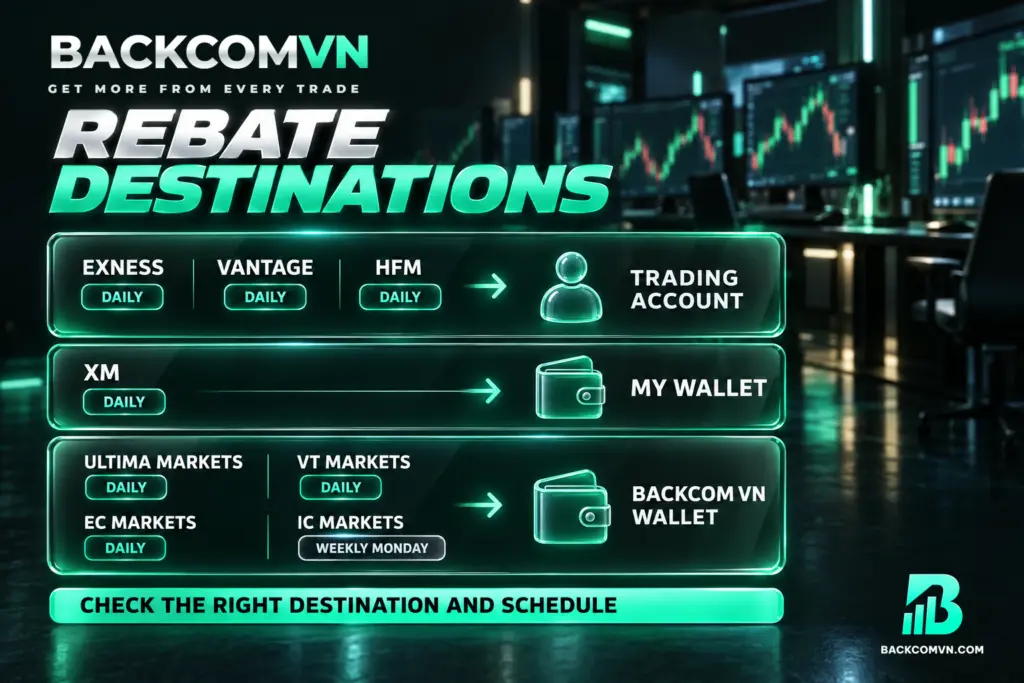
The table distinguishes registration codes from partner identifiers used in IB transfer requests. If a broker lists a code only in its partner-transfer procedure, do not assume you can enter that code instead of following the referral link when registering a new account.
| Broker | Referral code or partner identifier | Payment schedule | Payment destination |
|---|---|---|---|
| Exness | backcomio | Daily | Trading account |
| XM | BCGLOBAL | Daily | My Wallet |
| Vantage | bcglobal: Standard; supervip: High Rebate | Daily | Trading account |
| HFM | 30513100; the Markup 1 tier must be selected through its link | Daily | Trading account |
| Ultima Markets | New registrations use the link; IB 22592494 is for IB transfer requests | Daily | Backcom VN wallet |
| VT Markets | 0kpZyuRX | Daily | Backcom VN wallet |
| EC Markets | New registrations use the link; IB VN27934390 is for IB transfer requests | Daily | Backcom VN wallet |
| IC Markets | 95095 | Every Monday | Backcom VN wallet |
Exness lists daily processing between 11h–13h; XM lists 8–9h in the morning; Vantage lists 9–11h in the morning; HFM specifies the morning. These are rebate processing windows, not deadlines for account approval or IB transfers. Where a broker gives only a payment frequency, do not infer an exact arrival time.
The payment destination is easy to overlook. XM credits My Wallet, while IC Markets, EC Markets, VT Markets and Ultima Markets pay into the Backcom VN wallet. Checking only your trading account balance will therefore not establish whether those rebates have arrived. Open the relevant wallet when reconciling your payments.
Already have an account: open another or transfer IB?
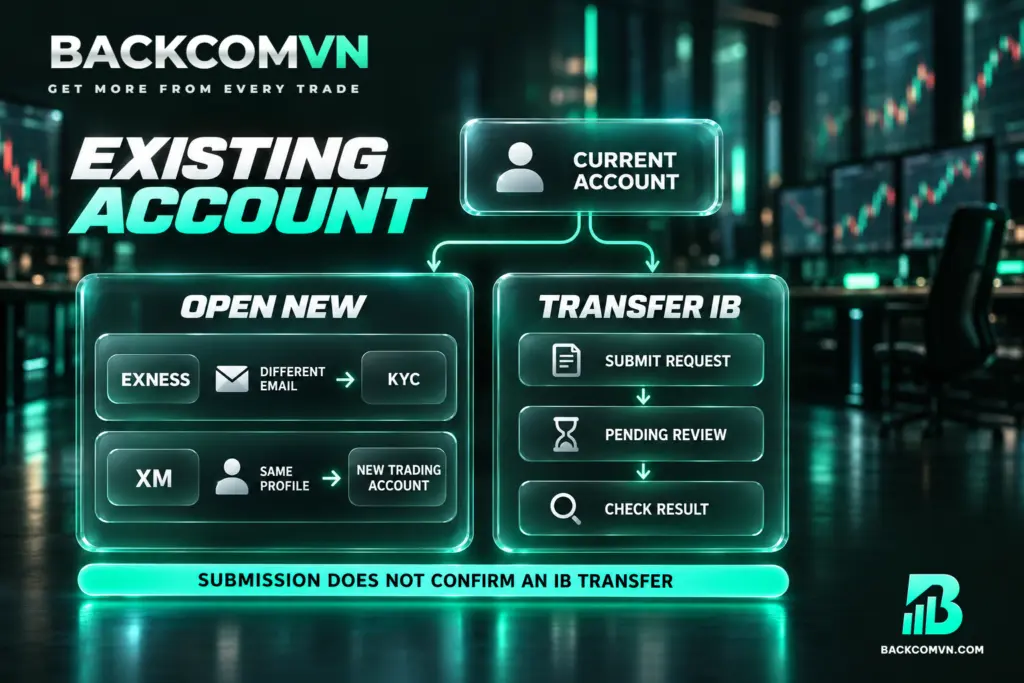
There are two routes: open a new account under Backcom’s referral code, or transfer the existing account to its IB. Opening a new forex rebate account means different things at different brokers. It may involve creating a profile with another email address or adding a trading account within your current profile.
Opening a new account
For Exness, the recommended route is to register a new account with another email address and the code backcomio, then complete KYC. Exness allows the same KYC identification document to be used for up to 10 accounts. This allowance is specific to Exness; do not apply it to other brokers without checking their own requirements.
For XM, go to Account Overview to register a new trading account. Select the platform and account type, enter BCGLOBAL during setup, then create a password for the new account ID. This adds a trading account through the account overview process, rather than creating a separate profile with another email address.
There are no processing times that establish which route is generally faster across all eight brokers. Opening a new account may require less coordination because there is no IB transfer request, and Exness favours this route. That does not establish a completion deadline, particularly where identity verification still needs to be completed.
Transferring the IB for an existing account
Vantage, IC Markets, EC Markets and Ultima Markets instruct users to send requests from the email address registered with the broker. Follow the IB transfer procedure and practical guidance, and work with Backcom support to check the result. A submitted request is not confirmation that your account’s partner attribution has changed successfully.
- HFM: open the HFM App, select Set Partner & Campaign ID, enter 30513100 and confirm. After a successful transfer, contact Backcom to check it, then create a new trading account.
- VT Markets: go to Profile → Transfer IB/CPA/Account Manager, open the relevant tab and select IB as the partnership type. Close all positions before submitting; only one request is allowed at a time. Once a request is completed or rejected, wait 72 hours before submitting another.
- Vantage: Cent accounts do not receive rebates. Existing Cent users need to create an additional Standard STP or RAW ECN account following the instructions.
Mistakes to avoid during registration and payment checks
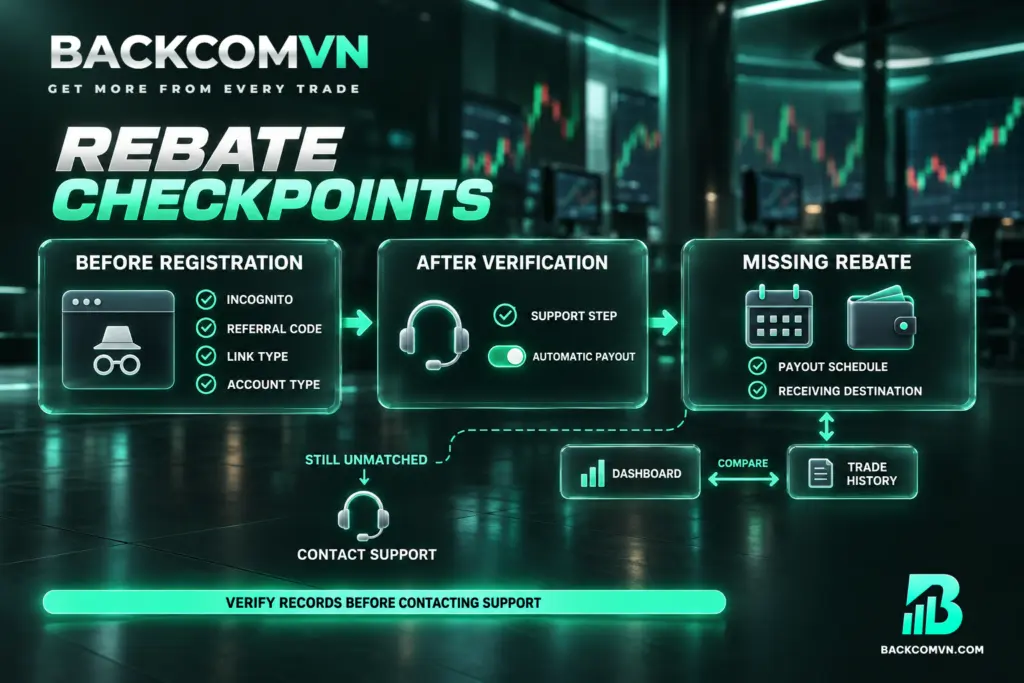
Several brokers repeat the recommendation to use incognito browsing to help preserve referral attribution. Open the incognito window first, access the Backcom link inside that window, then begin registration. Seeing the correct broker’s name is not enough: you still need to check the referral code and the particular link option being used.
For Exness, XM and IC Markets, the instructions prioritise entering the referral code. Check backcomio, BCGLOBAL and 95095 respectively before completing registration. The VT Markets code is 0kpZyuRX; compare it character by character with the table when entering it, rather than relying on memory or assuming it has been entered correctly.
Another mistake is selecting the correct partner but the wrong link option. HFM uses partner code 30513100, while the Markup 1 tier requires its specific link. Vantage’s two codes correspond to two different options. Checking the partner code alone is therefore insufficient where a broker offers multiple registration configurations with different trading conditions.
- Before completing registration: check the code, link option and account type you intend to use.
- After verification: review the broker-specific instructions for any support contact or automatic payment setup step.
- If a payment is missing: check the payment cycle and receiving wallet or account, then compare the dashboard with your trade history.
If the details still do not match, contact Vietnamese-language support through Telegram or Zalo. Identify whether the issue concerns registration, an IB transfer, payment setup or transaction reconciliation so that support can examine the relevant stage. Do not place additional trades simply to test whether your rebate arrangement is active.
Check rebate rates on each broker’s page
This guide does not list specific rebate rates because the applicable rates vary by account type and over time. Before choosing a registration link, visit the Exness rebates page, the XM rebates page or the equivalent page for your chosen broker to check the conditions that apply.
Where registration options have different spreads, read the trading terms alongside the rebate conditions on the Vantage rebates and HFM rebates pages. A larger rebate alone does not establish a lower overall trading cost, because the registration option may carry a different markup. Assess both parts together when comparing the available choices.
Likewise, compare the options on the EC Markets rebates and Ultima Markets rebates pages before opening an account. The useful question is which conditions apply to your particular account and registration option. A single displayed figure should not be treated as representative of every account or arrangement.
Frequently asked questions
How long do registration and verification take?
No specific timeframe applies across all eight brokers. Account opening, KYC approval and IB transfer processing are separate stages, each requiring its own status check. The rebate payment cycle cannot be used to estimate how long any of these stages will take to complete.
Do I need to link an account after opening it under Backcom?
Under the general process, attribution is automatic and no additional linking action is required. However, VT Markets includes a contact step to arrange automatic rebates. EC Markets and Ultima Markets also include support contact in their registration instructions, so check those steps separately from account attribution.
Is there a minimum trading volume requirement?
Backcom VN states that there is no minimum trading volume requirement and that a single registration enables ongoing rebates. This does not override the conditions of a particular account type. For example, Vantage Cent accounts do not receive rebates, so account eligibility still needs to be checked.
Do losing trades receive rebates?
Yes. Under the programme’s mechanism, rebates are paid on both winning and losing trades. A rebate is not an investment return and does not mean a trading loss will be fully offset. Increasing your trading volume solely to collect more rebates is therefore not a sound reason to take additional positions.
Conclusion
To set up a forex rebate account, choose the correct link or code, complete KYC, follow any broker-specific support steps and check payments against the appropriate schedule and destination. If you already have an account, establish whether you are opening an additional account or transferring its IB before starting the process.
The final check is that dashboard figures agree with your trade history and the payments credited. Check incognito browsing, referral codes and link options at registration, when those choices matter. Revisit the rebate conditions on the relevant broker page before deciding which arrangement applies to your account.
This article is for information only. It is not investment advice and not a promise of returns. Leveraged forex and CFD trading carries a high level of risk and can result in the loss of your entire capital. Each broker’s figures and conditions change over time — check them against the broker’s own page before you act.
The Backcom VN editorial team
The Backcom VN editorial team tracks forex trading costs: the fee schedules, rebate levels and licences of eight brokers, together with the market figures that feed into the cost of each trade. Every number we publish carries a public source and the date it was accessed, so you can check it yourself.
Related articles

How to get your Vantage rebate: link choice, payout and checks
Vantage offers two sign-up links with different markups, and the choice is permanent. What that means, plus the Cent-account exception.

How to get your XM rebate: setup, My Wallet and checks
Registering an XM account for rebates, why the money lands in My Wallet rather than the trading account, and how…

How to get your Exness rebate: setup, payout and checks
The three steps that put an Exness account under a rebate, when the money lands, and what to check first…

Why use a trading rebate — and when it is not worth it
A rebate moves your cost column, not your results column. What it changes, what it does not, and three cases…

Account base currency and the VND conversion nobody prices
Your account is in dollars and you fund in dong. The margin on those two conversions appears in no fee…

Vantage deposits and withdrawals: the same-name rule and the 50 USD minimum
Vantage states the rule other brokers let you discover the hard way: funds must be in the same account holder's…