
 The Backcom VN editorial team
20 min read
The Backcom VN editorial team
20 min read

In this article8
To receive an EC Markets rebate, you need to register through the appropriate partner link or transfer your IB relationship, complete setup with Backcom VN and check the amounts recorded after your trades close. This guide explains the steps, payment cycle and where to find your money. Before opening an account, consider your choice of registration link carefully: a higher rebate comes with an additional spread charge, so the overall trading cost matters.
Last updated: 09/10/2026.
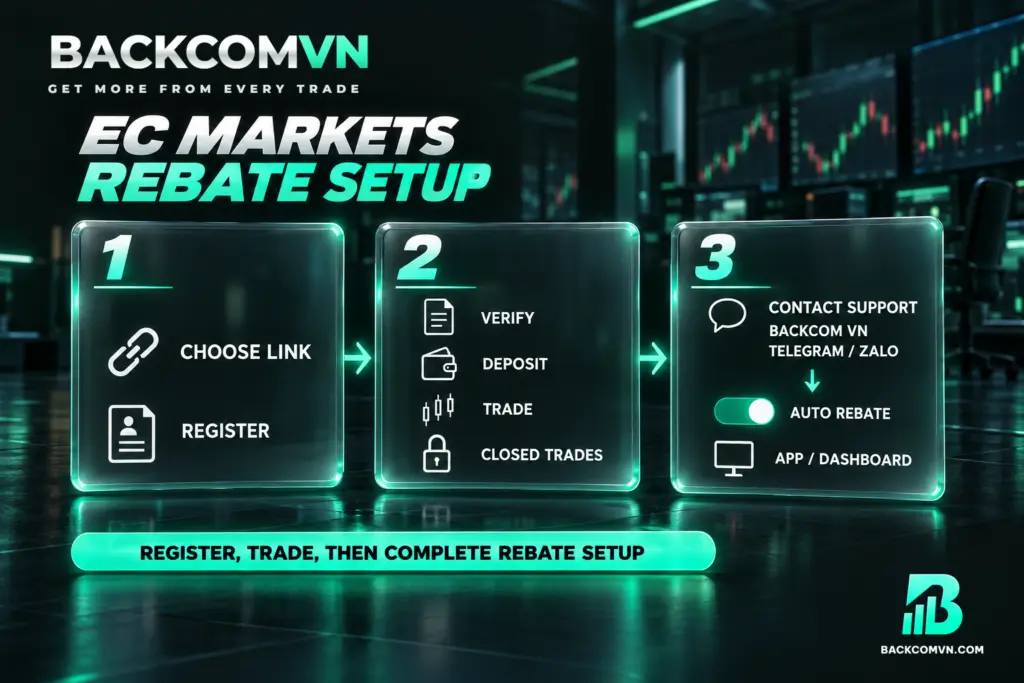
How to get EC Markets rebate in three steps
A rebate returns part of the introducing broker’s commission to you, based on trading volume. It refunds some of the costs already incurred and applies to both winning and losing trades. For an explanation of the mechanism before registering, read what forex rebates are and how they work.
1. Choose a link and register with EC Markets. Select one of Backcom VN’s three partner link types: No Markup, Markup 1 or Markup 2. When registering in a browser, use a private browsing tab to reduce the risk of losing referral tracking. Check the link type before creating your account, because its markup tier cannot be changed afterwards.
2. Verify your identity, deposit funds and trade with EC Markets. Complete KYC using a citizen identity card, driving licence or passport. Then fund your account and trade as usual. Only closed trades count towards eligible volume. Open positions should therefore not be included when checking whether your recorded rebate matches your trading activity.
3. Contact Backcom VN to set up automatic rebates. Send your details to Backcom VN’s Vietnamese-speaking support team through Telegram or Zalo. Once setup is complete, monitor your rebates in the Backcom App/dashboard. There is no minimum trading volume requirement. Registration is a one-off step for ongoing participation, although you should still check the conditions currently in force.
Choose your link type before opening an account
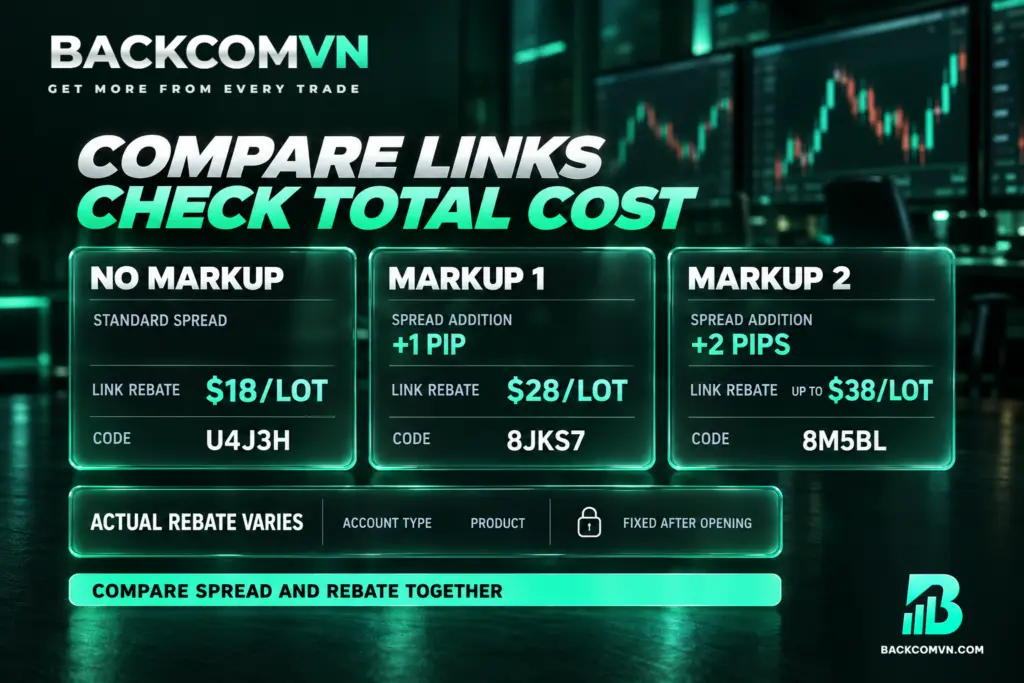
EC Markets has three link types, each with a preset spread markup and corresponding rebate rate. These rates must be considered alongside the account and instrument conditions. They do not mean that every trade earns the same amount, regardless of what you trade or which account you use.
- No Markup: standard spread, link rebate rate of $18/lot, code U4J3H.
- Markup 1: an additional +1 pip on the spread, link rebate rate of $28/lot, code 8JKS7.
- Markup 2: an additional +2 pips on the spread, rebate of up to $38/lot, code 8M5BL.
The actual rate depends on your account type and instrument. Code 8M5BL belongs to Markup 2. If entering a code manually, check that it matches your chosen link type. Do not enter this code in place of the No Markup or Markup 1 code if you intend to register under either of those options.
The trade-off concerns total cost: a lower spread comes with a lower rebate, while a higher rebate comes with an added spread charge. A larger EC Markets cashback payment does not, by itself, establish that your final cost is lower. Compare the same instrument, account type and volume using the method for calculating a trade’s total cost.
Your chosen link type cannot be changed once the account is open. Consider the commission returned to you separately from the markup you accept at registration. Receiving a rebate does not mean that all three link types offer the same spread.
When rebates are paid and where they arrive
| Item | EC Markets |
|---|---|
| Payment type | Automatic rebate |
| Payment cycle | Daily |
| Payment destination | Backcom VN Wallet |
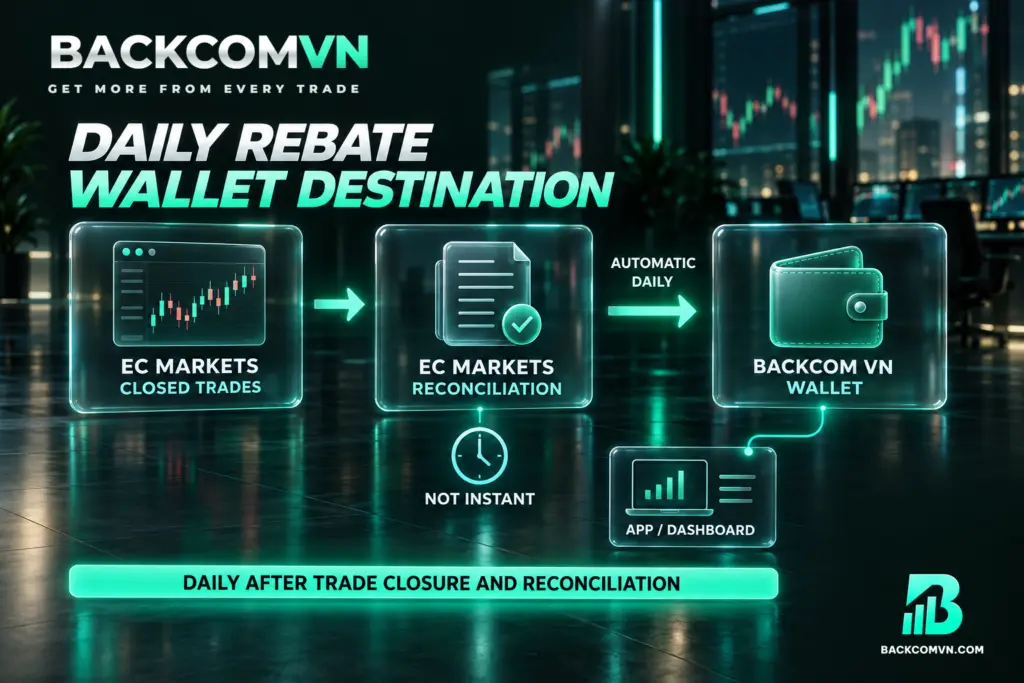
Your EC Markets rebate payout goes to the Backcom VN Wallet. Check the Backcom App/dashboard rather than relying solely on your EC Markets trading account balance. This distinction is easy to overlook: trading activity and rebate receipts are recorded in different places, and each needs to be checked separately.
The daily payment cycle applies after trades have closed and EC Markets has completed reconciliation. It does not mean that money appears immediately when you close a position. Do not assume a fixed payment hour and use that assumption to decide a rebate is missing. Check both the trade status and whether reconciliation has finished.
The dashboard lets you track amounts by day and by individual trade, then compare them with the broker’s trading history. If you find a discrepancy, start with closed trades within the period you are reviewing. This explanation of rebate payment cycles and payment destinations distinguishes the payment schedule from the conditions for recording a rebate.
What to do if you already have an EC Markets account
If you already have an account, request an EC Markets IB transfer to Backcom VN. Send your request from the email address registered with the broker to support@ecmarkets.com, using the subject line Change Account Owner. You can use the following template, replacing the text in square brackets with your email address:
Dear EC Markets Support, I would like to request the transfer of Client/IB: [your email address] To IB: VN27934390 Reason for transfer: Change of support and account management. I will take full responsibility for any issues arising after the transfer. Thank you.
After sending the email, give your email address to Backcom VN support through Telegram or Zalo so the team can liaise with the broker and assist with approval. Sending the request starts the process. Check the outcome before treating your account as successfully linked to Backcom VN.
Depending on the broker’s policy, you may need to create a new trading account or contact support for reconciliation. Existing accounts should therefore not be assumed to follow an identical process. Read about the IB transfer process and points to check to prepare the relevant information.
Why a rebate may not be recorded
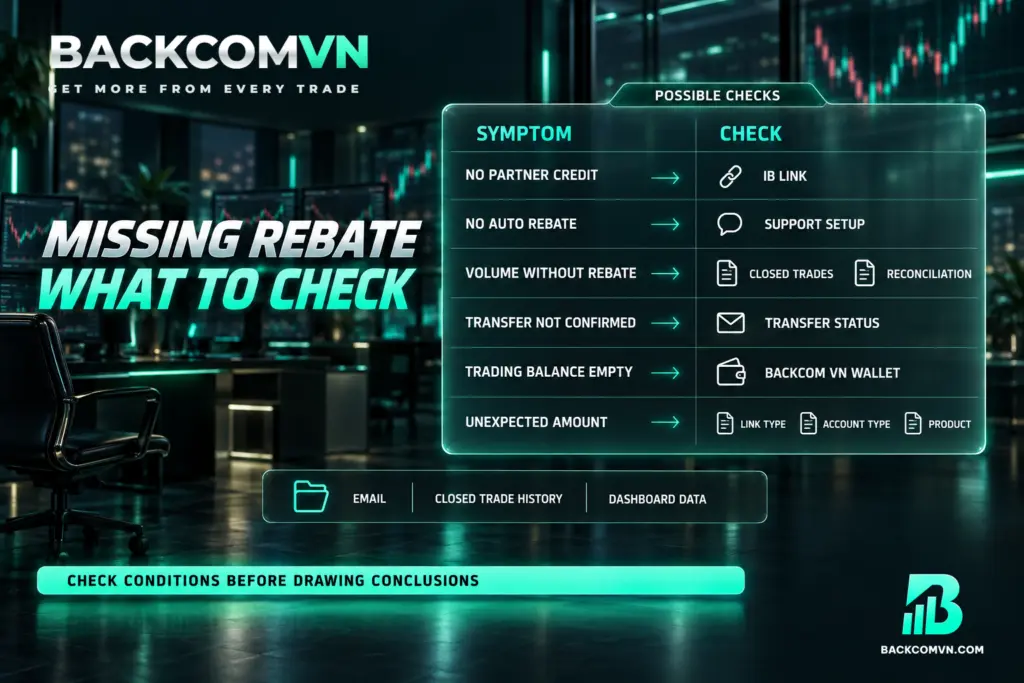
If a payment has not appeared, the issue may involve your partner link, incomplete setup or reconciliation timing. The table below provides starting points for investigation. It does not establish which explanation applies to your account without checking the relevant records.
| What you see | Common cause | How to check |
|---|---|---|
| You have traded, but activity is not recorded through Backcom VN | The account was opened directly, without a partner link, or referral tracking was lost | Ask support to check the IB relationship; for directly opened accounts, check the IB transfer procedure |
| You registered through a link but have no automatic rebates | The support contact and setup step is incomplete | Check with Backcom VN support through Telegram/Zalo |
| You have trading volume but no visible rebate | Trades are still open or reconciliation is incomplete | Compare trade status with the dashboard |
| You requested an IB transfer but it is not recorded | The request is incomplete or requires further processing under broker policy | Check the sent email, replies and outcome with support |
| No money appears in your trading account | You are checking the wrong payment destination | Open the Backcom VN Wallet in the App/dashboard |
| The rebate differs from your estimate | The calculation uses a rate for a different link, account type or instrument | Check the matching conditions and currently applicable rate |
A losing trade is not excluded merely because it lost money, and the programme has no minimum volume requirement. If the issue remains unclear, prepare your account email address, closed-trade history and dashboard figures for support to compare. You can also follow these checks when a rebate has not arrived.
Where to check EC Markets rebate rates
Instrument-by-instrument rates are not listed here because rates for individual symbols vary over time and by account type. Check the current EC Markets rebate rates by instrument, then match the relevant conditions to your account and registration link. Use the rate that applies to your circumstances when checking a payment.
The overall maximum is up to $38/lot through the Markup 2 link. Your actual rate depends on the account type and instrument, as well as your chosen link type. Do not apply the maximum rate to your entire trading volume without first verifying that the corresponding conditions apply.
Frequently asked questions
Can I receive rebates if I open an EC Markets account directly?
An account opened directly, without a Backcom VN partner link, is not recorded for rebates through this programme. If you have already opened one, request an IB transfer and verify the processing outcome before expecting rebates.
Where is EC Markets cashback paid, and how often?
Payments go to the Backcom VN Wallet on a daily cycle, after trades close and the broker completes reconciliation. Monitor the amounts recorded in the Backcom App/dashboard.
Do losing EC Markets trades qualify for rebates?
Yes. Rebates apply to eligible winning and losing trades alike. They return part of your trading costs; they do not cover your entire trading loss or represent an investment return.
Can I change my markup link after opening an EC Markets account?
The markup tier attached to your link cannot be changed after the account is opened. Choose between No Markup, Markup 1 and Markup 2 during registration, before committing to that account’s spread conditions.
Is EC Markets Markup 2 cheaper?
The rebate rate alone cannot answer that. Markup 2 adds +2 pips to the spread, so calculate the costs incurred and subtract the actual rebate, comparing the same instrument and trading volume.
Conclusion
Receiving rebates requires the correct partner relationship and completed setup with Backcom VN. Before opening an account, weigh the costs of each link type. After trading, compare your closed-trade history with the amounts received in the Backcom VN Wallet.
A rebate reduces only part of your costs. EC Markets is better suited to experienced traders; its Vietnamese-language community and resources remain more limited than those of larger brokers. Cryptocurrency trading is available only through CFDs, with no spot trading. Consider these limitations alongside the rebate conditions, and check the broker’s current product information and available support resources before deciding.
This article is for information only. It is not investment advice and not a promise of returns. Leveraged forex and CFD trading carries a high level of risk and can result in the loss of your entire capital. Each broker’s figures and conditions change over time — check them against the broker’s own page before you act.
The Backcom VN editorial team
The Backcom VN editorial team tracks forex trading costs: the fee schedules, rebate levels and licences of eight brokers, together with the market figures that feed into the cost of each trade. Every number we publish carries a public source and the date it was accessed, so you can check it yourself.
Related articles

Vantage deposits and withdrawals: the same-name rule and the 50 USD minimum
Vantage states the rule other brokers let you discover the hard way: funds must be in the same account holder's…

XM deposits and withdrawals: My Wallet, the 2–5 day window and real costs
At XM your money sits in two places, not one — and that is behind almost every 'where are my…

Exness deposits and withdrawals: channels, timing and the real cost
Automatic 24/7 withdrawal solves only one of three legs. The other two are where your money actually leaks.

How to cost a forex trade in full
Spread plus commission plus swap, minus the rebate. A worked example on 2 lots of EUR/USD held overnight: $30 gross,…

XM account types: Standard or Ultra Low
Ultra Low has the lower spread, but a lower rebate and fewer benefits. Compare the spread saved against the rebate…

Vantage Cent and swap-free accounts: the real cost
A Cent account is a bridge from demo to real money, not the cheapest option; and swap-free replaces swap with…