
 The Backcom VN editorial team
21 min read
The Backcom VN editorial team
21 min read

In this article7
- 1. Rebate not received: what to check first
- 2. Processing times and payment destinations across eight brokers
- 3. Payment lower than expected: verify the applicable rate
- 4. How to check forex rebate records against closed lots
- 5. Prepare the details before contacting support
- Frequently asked questions
- Conclusion
If you have registered but are dealing with a rebate not received, check your account status, the processing schedule and the payment destination before concluding that money is missing. If a payment has arrived but is lower than expected, start with closed lots and the conditions that apply to your account. Keep these situations separate: a payment awaiting its scheduled processing date needs a different check from a discrepancy that requires reconciliation.
Last updated: 09/10/2026.
1. Rebate not received: what to check first
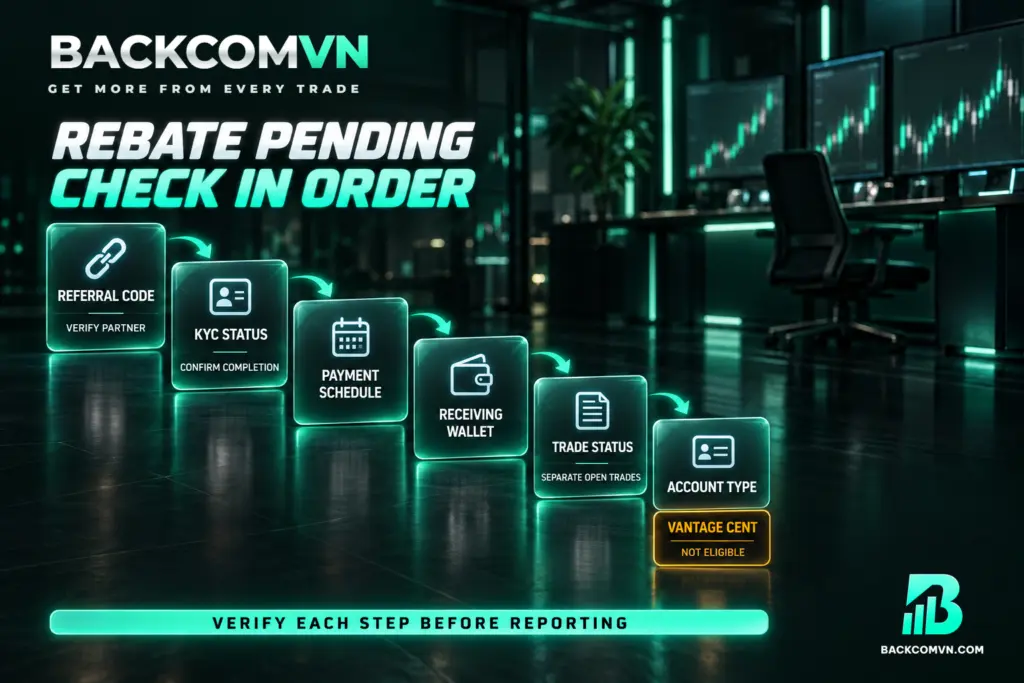
Work through the checks in this order: referral code, KYC, processing time, payment destination, trade status and account type. This is a practical order for investigation, rather than a ranking of how frequently each broker encounters problems. At every stage, look for something you can verify. An unchanged balance alone does not tell you which part of the process needs attention.
| What you notice | Possible cause | How to check |
|---|---|---|
| You registered, but no rebate activity appears | The account is not under the referral code, possibly because referral tracking failed during registration | Check the partner code and ask support to confirm that the account is under Backcom |
| Account verification is still incomplete | KYC has not been completed | Check verification status with the broker and complete it using suitable documents |
| The payment for the pending period has not appeared | The processing time or day has not arrived | Check the broker’s own schedule, particularly IC Markets’ Monday payment cycle |
| Your trading balance has not increased | You are checking the wrong payment destination | Check the trading account, My Wallet or Backcom VN wallet, depending on the broker |
| Your expected volume exceeds the volume being reconciled | You may have included trades that are still open | Separate open positions from closed trade history and confirm the recognition conditions |
| The checks above look correct, but there is still no rebate | The account type is not eligible | Check the account type; Vantage Cent accounts do not receive rebates |
First, confirm the referral code. Clicking a registration link does not establish which partner your account was actually assigned to. Backcom’s browser registration guidance recommends an incognito tab to help avoid referral tracking problems; where a broker provides a referral code, enter it correctly. For an existing account, establish its current partner attribution before making changes. This gives you a confirmed starting point.
Next, check KYC. Registration requires verification with the broker using a citizen identity card, driving licence or passport. Check that verification shows as completed: having uploaded documents is not the same as receiving confirmation. Accounts opened under Backcom are recorded automatically and require no additional linking step. VT Markets has a separate requirement to contact support to set up automatic Backcom rebates.
Then check the schedule, receiving wallet and trades. Do not assume that the dashboard is missing volume because you have counted open positions. Keeping those positions separate lets you compare the same scope, while the broker’s recognition conditions still need confirmation. Finally, verify the account type. Vantage Cent does not receive rebates; the guidance for this situation is to create an additional Standard STP or RAW ECN account.
2. Processing times and payment destinations across eight brokers
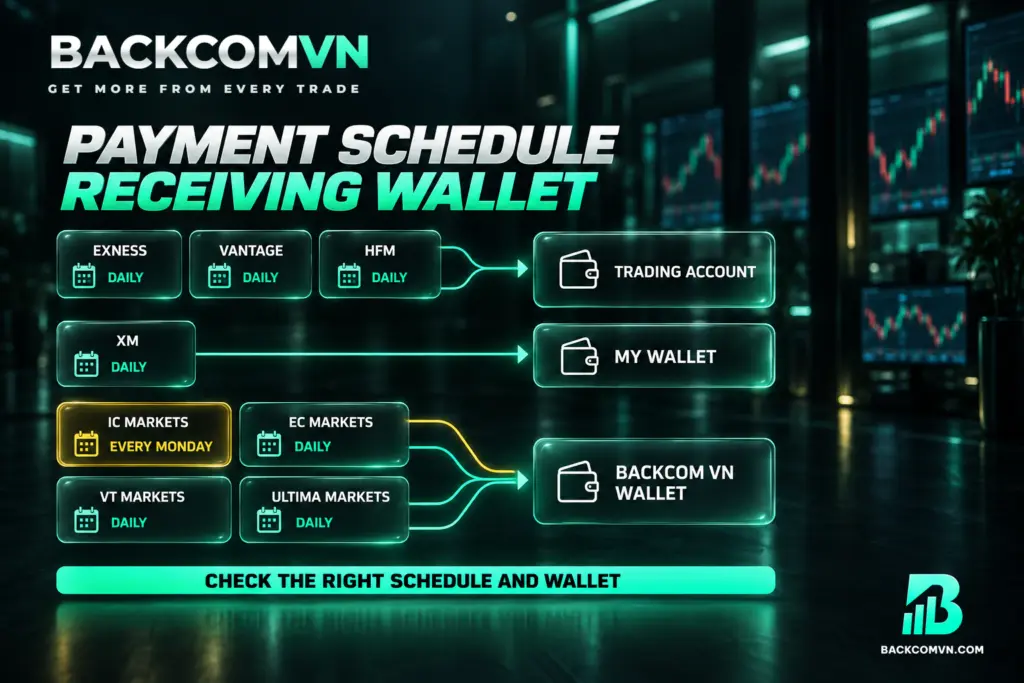
“Paid daily” does not mean that every broker pays at the same time or into the same place. Some credit the trading account; others use a separate wallet. Use the table to identify where to look, then consult the rebate payment cycles for eight brokers when reviewing the schedule. A rebate not credited to your trading balance may already be visible at its designated destination.
| Broker | Payment cycle and processing time | Payment destination |
|---|---|---|
| Exness | Daily, 11h–13h | Trading account |
| XM | Daily, 8–9h in the morning | My Wallet |
| Vantage | Daily, 9–11h in the morning | Trading account |
| HFM | Daily, in the morning | Trading account |
| IC Markets | Every Monday | Backcom VN wallet |
| EC Markets | Daily | Backcom VN wallet |
| VT Markets | Daily | Backcom VN wallet |
| Ultima Markets | Daily | Backcom VN wallet |
HFM’s timing is described as morning, without a specific hour. For EC Markets, VT Markets and Ultima Markets, a daily cycle does not establish an exact processing time. The rebate payout cut-off also needs confirmation when deciding which trades belong to a payment period. Ask support which period is being reconciled before deciding that a particular payment has passed its expected processing window.
IC Markets deserves particular attention here: checking the wallet every day and expecting a daily payment does not match its weekly Monday schedule. Similarly, XM users need to check My Wallet. Users of brokers that pay into the Backcom VN wallet should inspect that wallet directly. Looking only at the trading balance leaves out the destination where those payments are made.
3. Payment lower than expected: verify the applicable rate
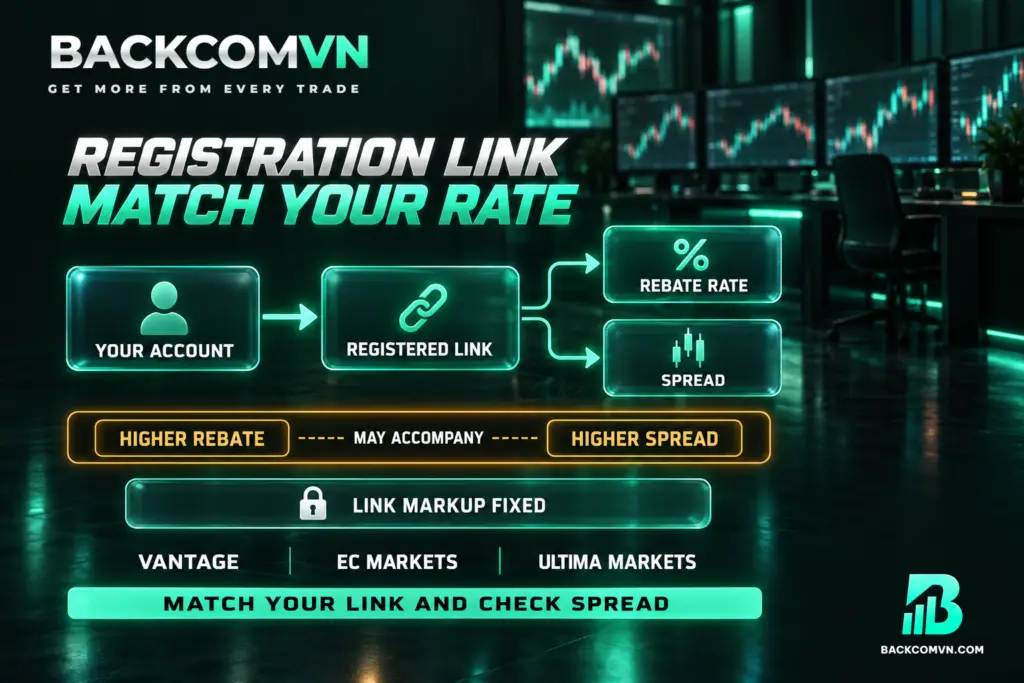
A payment below your estimate does not, by itself, establish that money is missing. Identify the registration link, account type and trading scope behind the rate you used. In particular, do not treat the highest displayed rate as the default for every account. Your expected amount is only useful for reconciliation if its assumptions match the account being checked.
Some brokers offer several registration links, each with its own rebate rate and associated spread. A common mismatch occurs when an account was opened through one link but the expected rebate was calculated using another link’s rate. In that case, the estimate was inconsistent from the outset. The table below presents the link options using each broker’s figures.
The useful habit is to establish which registration link applies to your account before selecting a rate for comparison. A link offering a larger rebate often comes with a wider spread. That means the extra rebate may already have been offset by the cost of entering the trade. Comparing the payment alone leaves out part of the calculation.
These options show the limitation of judging an arrangement solely by its rebate amount. With Vantage, EC Markets and Ultima Markets, choose the link before opening the account because its associated markup cannot be changed afterwards. To assess the rebate within the full cost of trading, also review how to calculate the total cost of a forex trade. Check both sides of that comparison before interpreting a higher rebate as a lower overall cost.
4. How to check forex rebate records against closed lots
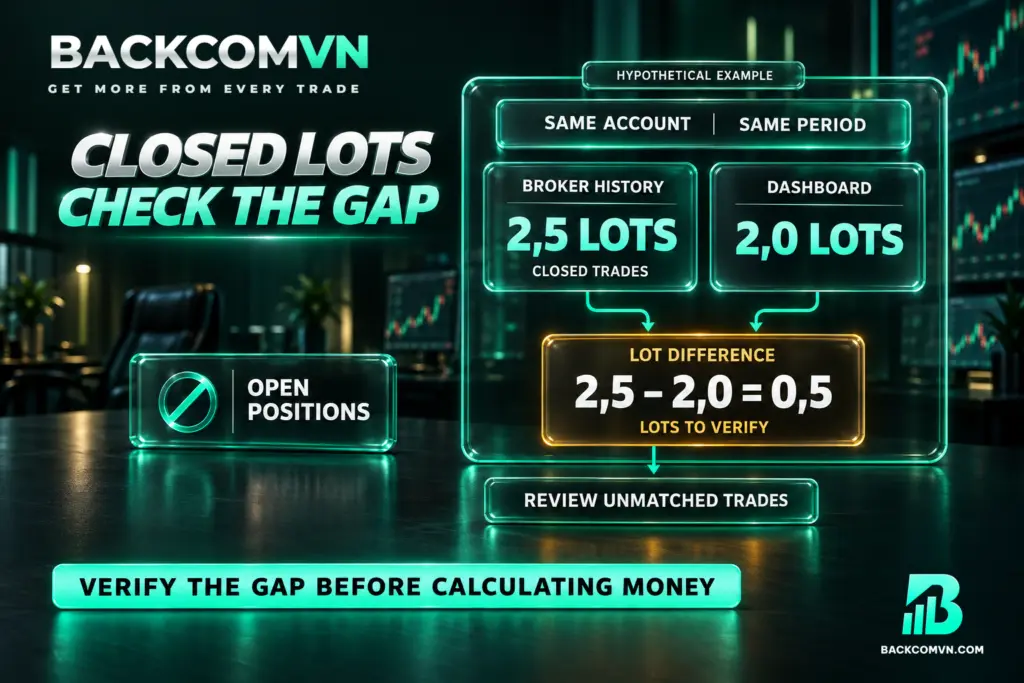
You can reconcile closed lots by comparing the dashboard with the broker’s trade history. The figures are meaningful only when they cover the same account and time period. Avoid comparing activity across several accounts with a dashboard filtered to one account, or a whole month’s history with a single payment period. Establish the scope before interpreting any difference.
- Select the account to check and record its broker and account type.
- Define the reconciliation period and the corresponding payment cycle.
- Open the broker’s trade history and separate closed trades from positions that remain open.
- Total the closed lots within that scope, retaining individual trade details so each entry can be traced.
- Select the same scope on the dashboard and record the displayed lot total.
- If the totals match, check the rebate rate and payment received; if they differ, identify the trades responsible for the difference.
For example, suppose the history for one account contains 2,5 closed lots during the period under review, while the dashboard shows 2,0 lots. The volume requiring investigation is 0,5 lots. Do not immediately multiply that difference by a rebate rate and declare the result missing. You still need to establish the applicable conditions and the period in which those trades should be recognised.
If the totals differ, review the filters first. Then list the unmatched trades with their trade IDs, instruments, volumes and closing times, and send that list with a dashboard screenshot to support. If the lots already match but the payment differs from your estimate, focus on the applicable rebate rate, markup option and payment destination. Those checks address a different discrepancy.
5. Prepare the details before contacting support
A clearly defined request helps support investigate the actual difference. Include the broker, the account being reconciled, KYC status, the referral code used, the pending payment period and the destination you have checked. Add the lot total from the broker’s history, the dashboard total and any unmatched trades. For a rebate not credited, these details help establish what is awaiting processing and what needs further investigation.
If the issue concerns partner attribution, read the IB transfer process and key considerations before making changes. Submitting a transfer request does not confirm that the transfer has succeeded. VT Markets requires all positions to be closed before submission. Submit only one request at a time, and wait 72 hours after a request is completed or rejected before submitting another.
You can keep the message brief: “I am reconciling this account for this period. The attached trades account for the difference between the broker’s history and the dashboard. Please check partner attribution, recognition conditions and the payment cycle.” Attach the records that support the comparison so the request has a clear scope. Backcom provides Vietnamese-language support through Telegram and Zalo.
Frequently asked questions
Can a losing trade explain why no rebate arrived?
Rebates are paid on both winning and losing trades. A trade’s outcome therefore does not explain an outstanding payment on its own. Check partner attribution, account eligibility and the payment schedule instead of assuming that the loss made the trade ineligible.
Are rebates withheld when trading volume is low?
Backcom states that there is no minimum trading volume requirement. Do not infer that you need to trade more to receive a pending payment. First check the payment cycle and whether the relevant activity has been recorded against your account.
How do I identify the correct rebate rate?
Check the relevant broker page and the registration link option you used. The rebate comparison by instrument can help you review the basis for comparison. Then confirm the rate that applies to your own account before using it to calculate an expected payment.
Does an open trade missing from the dashboard indicate an error?
There is not enough information to conclude that it does. Keep open positions separate when comparing closed lots. To establish which period a particular trade belongs to, ask support to check the broker’s recognition conditions rather than assuming it should already appear.
Conclusion
When a rebate has not appeared, start with referral attribution and KYC, then check processing times, payment destination, trade status and account type. When a payment is lower than expected, the essential checks are whether both records cover the same scope and whether your calculation uses the applicable rate.
If a discrepancy remains, send the trade history, dashboard lot total and payment period to Vietnamese-language support through Telegram or Zalo. Specific records help distinguish a payment still awaiting processing from an amount that may need adjustment after reconciliation. Keep the request focused on the account, period and trades you have checked.
This article is for information only. It is not investment advice and not a promise of returns. Leveraged forex and CFD trading carries a high level of risk and can result in the loss of your entire capital. Each broker’s figures and conditions change over time — check them against the broker’s own page before you act.
The Backcom VN editorial team
The Backcom VN editorial team tracks forex trading costs: the fee schedules, rebate levels and licences of eight brokers, together with the market figures that feed into the cost of each trade. Every number we publish carries a public source and the date it was accessed, so you can check it yourself.
Related articles

Can't reach your forex broker? Change DNS in 5 steps, and four things to try next
Three different layers can block a broker site, and only one of them is fixed by changing DNS. Diagnose first,…